Here is a link to my first CCR.
https://drive.google.com/file/d/1ze2B4ddLIPe2KcHR_S-aFuVXDBm2N1Na/view?usp=drivesdk
Here is a link to my second CCR.
https://drive.google.com/file/d/1UpKsgUAQcLbqUEAWLePpV0G4D4NB8KF9/view?usp=drivesdk
Here is a link to my first CCR.
https://drive.google.com/file/d/1ze2B4ddLIPe2KcHR_S-aFuVXDBm2N1Na/view?usp=drivesdk
Here is a link to my second CCR.
https://drive.google.com/file/d/1UpKsgUAQcLbqUEAWLePpV0G4D4NB8KF9/view?usp=drivesdk
Here is a link to my film opening, Unpacking.
https://drive.google.com/file/d/1Ao_5olt2j753scPwYA3-gWH36vXkY0qa/view?usp=drivesdk
Yours (for now),
Clover Fields
I decided to do a "director's cut" style interview video for my first and second reflection questions in the making of Unpacking. I asked my partner, Foutch, who was also an assistant cinematographer for Days 2 and 3 of filming, to assist me in the production.
The two questions I sought to answer during the making of this installment of my CCR were questions 1 and 2. To begin with question 1: How does your product use or challenge conventions and how does it represent social groups or issues?
From my script:
"Unpacking utilizes aspects of the teen drama and coming-of-age film genres, to represent the marginalized intersection between racial minorities, homeless youth, and queer teens in America. The themes of identity, authority vs. autonomy, and alienation, as well as a heavy focus on music to convey emotion, were features of the teen dramas I studied in my research for this production- films like Lady Bird by Greta Gerwig, The Half of It by Alice Wu. A lot of teen dramas are about this kind of- finding yourself- and conflicts between teenagers and their parents because of a critical split in ideology. That disparity between young and old- it's so often highlighted by other barriers in the real world, like socioeconomic status, cultural status, racial status, and being a displaced minority trying to fit into a household really fits into that teenage question of- what is my place in the world?"
Then, question 2: "How does your product engage with audiences and how would it be distributed as a real media text?"
"Unpacking, as an amateur indie film, will be distributed primarily virtually. I chose YouTube as my primary method of distribution, because of its low cost, high accessibility, and compatibility with any marketing or advertisement done in the online sphere like Instagram or TikTok posts. Also, since my production appeals to teenagers, I decided to use a platform that the vast majority of teenagers are highly active on. In fact, about three-quarters of teenagers like us use YouTube every day. But I also plan to distribute to audiences who are highly invested in the drama genre and the indie film scene at film festivals like the Miami film festival and my school's own film festival. So- don't worry. There's plenty of ways to see Unpacking on any size of screen, almost anywhere in the world."
The end is nigh! Soon... soon...
Yours (for now),
Clover Fields
Here it is, friends. The long-awaited second (and third, and fourth) day of editing. Strap yourselves in, this one's going to be a doozy.
On day 2 of editing, I finally bit the bullet and attempted to conquer the beast, as it were. Rather mythical and knightly of me; if only I were trying to understand a dragon, a unicorn, or even a horse- not Adobe Premiere Pro. But, while I'm still not 100% familiar with it, these Adobe tutorials (included with my school-sponsored subscription) really helped.
I had to do some research to find software that would allow me to download Isolated by Kevin Macleod. Upon seeing this blog post by Techradar, I decided 4K Video Downloader (here) would be my best option. After copying and pasting the link to the music, I had an mp3 file ready to go.
However, even after I started getting more comfortable with the interface of Premiere Pro, I realized that something weird was happening. My footage was seriously glitching. After doing some research (here), I realized that my iPhone had encoded my footage with a variable frame rate rather than a constant frame rate; so I was getting rectangular glitches around any of my shots where the ~30 fps frame rate couldn't accommodate the motion- like doors opening or even Bia's hair moving.
After agonizing over the issue, I tried to fix it by rendering and replacing my clips, and when that didn't work, re-encoding my footage with a constant frame rate. Using Handbrake, which was recommended on the Adobe Community threads, I processed my footage to a constant frame rate of 30 fps. But when I played it back using the Adobe Premiere Pro Source Panel, I still saw that same visual glitch. So, back to iMovie I went.
This time, I was really strapped for time, since I'd already done some finer cuts in Adobe Premiere Pro that I liked. My main goal, however, was to create a shot/countershot in iMovie, and create a comprehensive soundscape- mostly focused on the intro song, "Isolated" by Kevin Macleod. I'd already decided on a different take of the bedroom conversation that I wanted to cut to as the countershot- one angled towards Bia. Then, another two problems became apparent: my artsy quote from Richard Siken's The Worm King's Lullaby (here) was something I'd need to format and produce; and a lot of the environmental sound I'd captured on set was staticky or distracting. But no matter; as a placeholder for the quote, I found a 10 second black screen video that I cut down to 5 seconds (here, downloaded using 4K Video Downloader again), and I went through and muted a lot of the clips.
Then, for the entryway scene and for Charlie coming down the stairs, I recorded a simple door foley in two parts: an open and a close. I ended up using the opening twice, and the close once.
I did run into another problem: the credits' pacing was off. However, I really liked the natural fade-out of the piece as Charlie closed the door about a minute in; so I couldn't figure out a way to re-pace the credits without disturbing that.
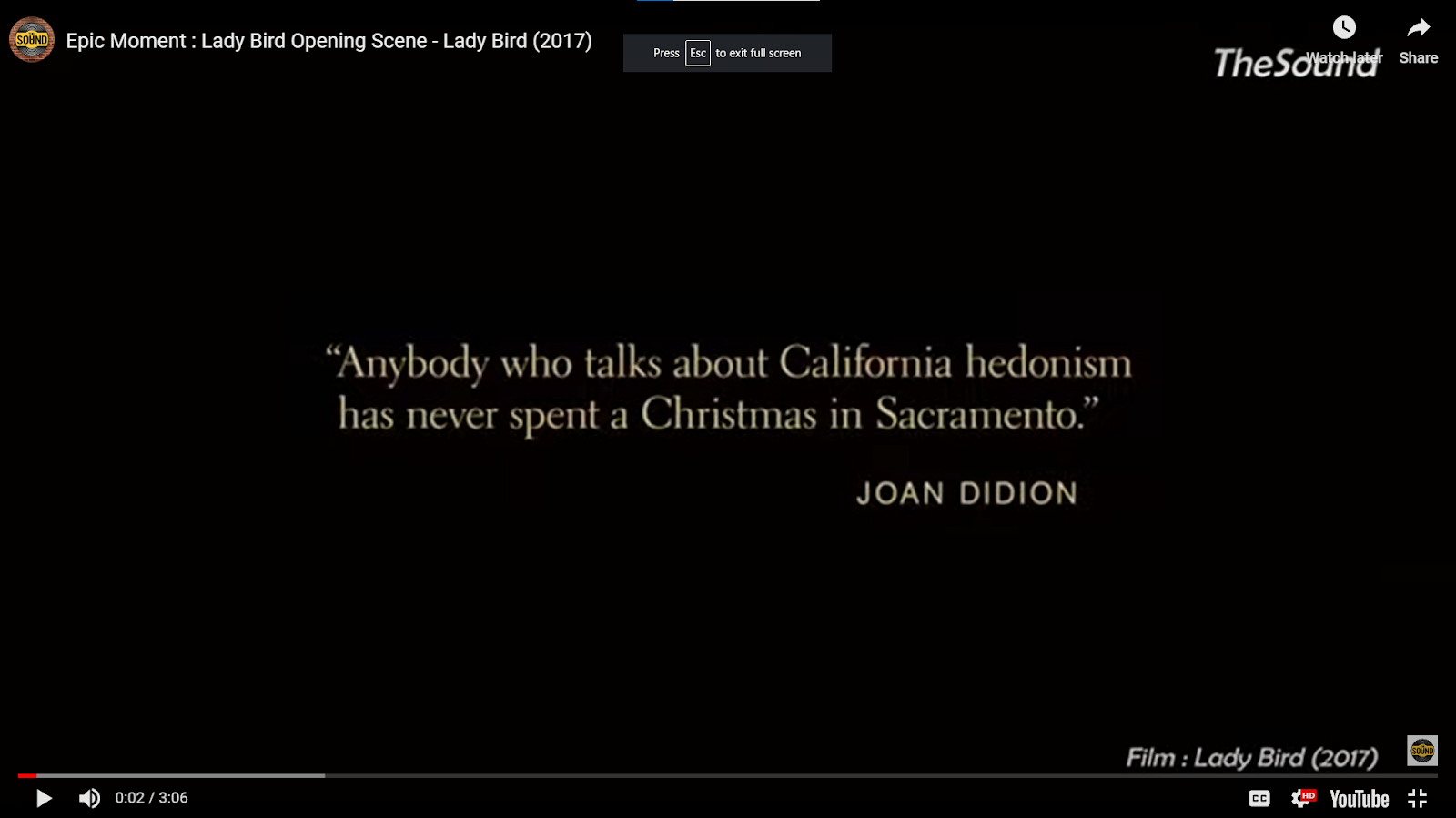
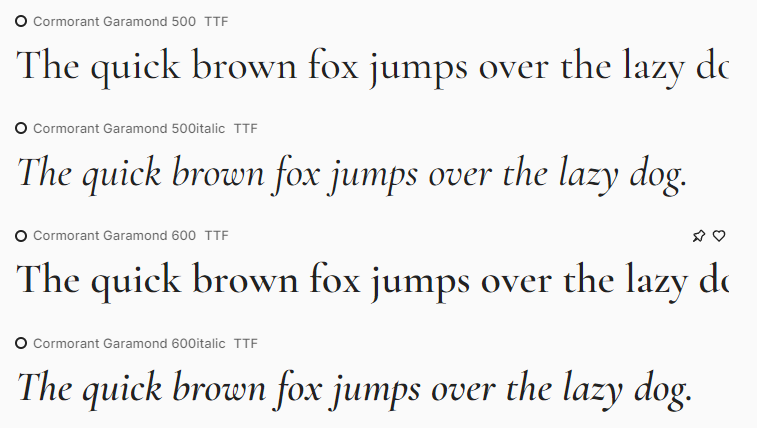
Going back to the artsy quote, though- I decided on FontBase (after reading this ranking). Upon opening the program, I found myself staring at a myriad of fonts. I had a few immediate thoughts, though; I knew that I wanted a serif font, similar to the font at the start of Lady Bird- read my review here- but that I wanted the author's name and source of the quote to be in the same font.

Finally, all that was left was to use iMovie's Detach option and Fade in and Fade out tools to smooth out my audio transitions between the Foley sound I added and the environmental sound recorded on set.
Big things are happening soon.
Yours always,
Clover Fields
Sources:
How to create a video project. (n.d.). Helpx.adobe.com. https://helpx.adobe.com/premiere-pro/how-to/create-project-import-media.html?playlist=/services/playlist.helpx/products:SG_PREMIEREPRO_1_1/learn-path:get-started/set-header:ccx-designer/playlist:ccl-get-started-1/en_us.json&ref=helpx.adobe.com
updated, S. W.-W. last. (2021, December 17). 4K Video Downloader review. TechRadar. https://www.techradar.com/reviews/4k-video-downloader
Media, O. (n.d.). 4K Download – Free and useful applications for PC, Mac and Linux. 4K Download. Retrieved March 30, 2023, from https://www.4kdownload.com/38
Isolated | YouTube Audio Library. (n.d.). Www.youtube.com. Retrieved March 30, 2023, from https://www.youtube.com/watch?v=L1mtJ4YirEw&list=PL93uzrz9f1_RBdYVSY9QTSUo4faT6WRRX&index=4
G2. (2023, April 1). Best Font Management Software [Review of Best Font Management Software]. Https://Www.g2.com/. https://www.g2.com/categories/font-management
Premiere Pro Glitching Videos in Preview and Export - Source Footage Fine. (2019, August 6). Https://Community.adobe.com. https://community.adobe.com/t5/premiere-pro-discussions/premiere-pro-glitching-videos-in-preview-and-export-source-footage-fine/m-p/10563336
HandBrake: Open Source Video Transcoder. (n.d.). Handbrake.fr. https://handbrake.fr/
FontBase — a Free, Beautiful, and Fast Font Manager. (n.d.). FontBase. https://fontba.se/
The major advantage, I feel, of being a teenager producing a film for teenagers is that I have a rather innate and contemporary understanding of modern youth. However, I did run into some process issues while conducting my research. Friends, this genre research post has been in the making for nearly as long as Unpacking has. Let me tell you why.
I started my genre research long before any of my script and storyboard came to be. Part of it was my existing knowledge as a consumer of films and other productions aimed towards teenagers. I knew I wanted to research coming-of-age films, teen films, and teen drama films. That part is unexplainable; the creative bug often doesn't naturally lend itself to description, I feel. But after that, actually finding research statistics for the teen drama or coming-of-age genres was very difficult.
To begin with, my preliminary searches- on both Google and Ecosia- turned up a surprising dearth of categorization in the teen drama or coming-of-age genres. Most of the information on Wikipedia was incomplete, didn't provide statistics or characteristics, or didn't apply to anything produced in the film medium in the last 10-20 years. However, this writers' blog (here) provided some useful information to me. The main elements of a modern teen drama have to do with intensifying and making relatable the feelings of alienation, self-exploration, peer pressure, and pressure/anxiety of growing up in general that all teenagers often face. Also, since the rise of the Internet, they often deal with the fast pace the Web has enabled bullying and harsh criticism to take.
Overall, while drafting Unpacking, I knew that some of the themes of emotional instability, existential angst, and the confusing boundaries of friendship vs. love vs. family often present in the lives of teenagers (I should know; again, I am one) were things I could express through different elements of my production. But- this research is, finally, available to your eyes- and not just in my brain.
Yours always,
Clover Fields
P.S. I hope you miss that outro. We're getting pretty near to the point where it's stopped feeling like an "always" and started feeling like a "for now". That's a different story, though. This story is still mine.
Sources:
Scripts, I. (2022, April 22). How Do You Write BRILLIANT and ALTERNATIVE Teen Drama? Industrial Scripts®. https://industrialscripts.com/teen-drama/
Wikipedia Contributors. (2023, February 25). Wikipedia. https://en.wikipedia.org/wiki/Drama_(film_and_television)#Teen_drama
Wikipedia Contributors. (2019, April 11). . Wikipedia; Wikimedia Foundation. https://en.wikipedia.org/wiki/Teen_film


Readers, I can't help but quote Taylor Swift in this post title. Because, as all mathematicians "stand on the shoulders of giants"- and, indeed, does everyone- I couldn't have continued through the development, production, and post-production without my classmates and peers. Namely, a very, very special shout-out to Bia, who I'm sure I've mentioned more than a few times already; but also to my other peers.
During class, one of our activities was a group discussion to provide feedback and discuss our projects with our peers so we could all gain better mutual understandings of where we were in our progress, and any final tweaks that maybe needed some new eyes. Because of delays to my project schedule, namely health concerns that impeded filming as well as my own lax schedule-following, I had not begun the editing process yet. Unfortunately, the final day of class time that's free to be spent in discussion or working independently will not be a time when I'm able to receive class feedback, since I'll be at an urgent emergency doctor's appointment.
However, I was still able to glean some insight from talking to Bia about the footage out of class and on set, as well as showing two of my classmates in class the tracking shot that led to my production logo. They agreed that the motion of the shot included a nice reveal of my production logo, and the box mechanic with which I'm displaying my credits. However, I said I felt the pacing was uneven and jarring, and they agreed. After I had my first rough cut, I showed Bia. My initial plan had been to do a voice-over of a conversation between Christine and her mother, to hint at some more of the themes present in the movie. We discussed how she could record the voice-over- from close up, or from far away. We also discussed how there were some jarring scene transitions. Although I've since rethought the voice-over conversation- more on that later- her feedback on which scenes I thought should be zoomed was really helpful, and I'll definitely keep it in mind during my editing process as it continues.
Readers, I shall see you very, very soon for a discussion of my first day of editing.
Yours always,
Clover Fields
Sources:
Wikipedia Contributors. (2019, June 4). Standing on the shoulders of giants. Wikipedia; Wikimedia Foundation. https://en.wikipedia.org/wiki/Standing_on_the_shoulders_of_giants


After some discussion with my instructor again, I've decided on the format of my two CCR productions: an interview for questions 1 and 2, and a slideshow with voice-over commentary for questions 3 and 4.

On my initial post about my CCR (here), I expressed my interest in doing a podcast format for questions 3 and 4. However, I felt that visuals would aid the engagement level of answering questions 3 and 4, since I could include stills from behind the scenes of production, screen captures of my previous projects, and screen captures of resources like Google Drive, which I used extensively, as well as other screen captures of technological resources. So, a voice-over slideshow presentation seems like a good fit. It's also going to be relatively quick and easy for me to gather screen captures and put them into a presentation, since we're nearly at the finish line of completion and time is of the essence.
However, my first CCR (for questions 1 and 2) will take a little longer to set up. Most of the planning process of the interview's production took place in my head, but here is what I've decided: I'll script it today, and then we can record the conversation. (I am happy I won't have to produce a full advertising package for my film opening.) I borrowed a tripod from my instructor to facilitate the actual production.
Now that I'm right down into the middle of the editing process for Unpacking, I'm also a little concerned about how long this CCR is going to take to edit. So, I'm going to use a notepad at the beginning of every take to label it, and I'm also going to make sure my partner and I record with sufficient pause between each conversational unit so that I can edit it. Hopefully, his experience with public speaking and my familiarity with my own speech patterns will make scripting, rehearsing, and performing faster.
We're almost there. I'll see you again after scripting- and then for production and editing.
Tired, but still yours always,
Clover Fields


Friends, this post has been long in the making. Or, rather, the actual post hasn't been, but rather the process the post describes. On Sunday, March 12th, Day 1 of filming for Unpacking happened.
A few things complicated it. First of all, I was with two of my friends from Orlando, Max and Ellie; they kindly agreed to help out on the day of filming, which was a huge help I hadn't anticipated, since- well- they live in Orlando. I've worked with both of them before on individual projects across lots of mediums, but never film. Second of all, we started filming in the afternoon, around 3 pm; and as the sun set, we had to worry about losing natural daylight.


When I was looking for editing software for Unpacking, I had originally only one thing in mind: using Adobe Premiere Pro. However, although I'd experimented with it very briefly for previous projects, I had never done the brunt of the work editing any major video on it, and I was really intimidated by how tech-heavy the interface was. So, it was time to find a new editing software.
I had a few requirements in mind. First of all, it had to be free. Not only was that within the constraints my instructor set out for our learning, but as a genuine amateur filmmaker, my budget is zero (0) dollars. I used the two blog posts linked below in my citation to find some free options.
Finally, I settled on three: Adobe Premiere Rush, which would be free with my school-account Adobe Creative Cloud subscription; DaVinci Resolve; and iMovie. Finally, I decided on a combination of Adobe Premiere Rush and iMovie. This was for a few reasons: I knew that I wanted a specific slow computerized zoom, which my instructor told me was available on iMovie, but since I don't have access to a MacOS computer, it would be unwieldy for me to try and precisely edit the entire thing on my phone, without keyboard shortcuts, since I have limited functionality in my hands with certain movements. After fiddling with Premiere Rush to rough cut my clips into takes that I could store in different places like my phone, my computer, and Google Drive to ensure that my footage was available everywhere, I liked the keyboard shortcuts and feel of it enough that I decided that was going to be what I used to edit the pacing and audio for the majority of Unpacking. However, I think I'm going to use iMovie to edit any zoom effects, of which there will be at least two or three.
Sources:
https://www.facebook.com/lifewire. (2019). Need a Free Video Editor? These Are 2019’s Best Video Editing Programs. Lifewire. https://www.lifewire.com/best-free-video-editing-software-programs-4128924
January 2021, J. P. 22. (n.d.). The best free video editing software 2020: free video editors for all your projects. TechRadar. https://www.techradar.com/best/free-video-editing-software
Readers, a key element of any production is music, but especially so in the teen drama genre.
In Paste Magazine's review of "The 10 Best Teen Movie Soundtracks of the 21st Century", here, many indie songs popular at the time of each production's release were used during the sound production of the film. This is partially because of the feeling that music evokes in an artistic sense, but more practically, it's also a useful tool to engage viewers with songs they may already listen to that deal with similar themes.
So, keeping all this in mind, I made a Spotify playlist of a few songs that I was thinking of using for my film opening.
I knew that, after discussing my storyboard with my instructor, that my initial establishing shot of the car and the slow zoom-out on Charlie sitting in the backseat of the car was going to need music. This was done for multiple reasons. Not only is a common theme of teen movies and all of adolescence using music to express and understand one's feelings as an escape mechanism, but- as a musician- music also helped me get through the events Charlie's story and Unpacking are based off of. But personal reasons aside, I also knew that the emotional intention of the shot would work well with a soundtrack, because a large part of the themes I wanted to communicate within my initial sequence were those of alienation, loss of support, loss of innocence, and loneliness, while also (it must be said) imbuing my work with a certain cinematic quality that only music can ever provide. So, I turned to my existing body of knowledge as a musician and consumer of music: I knew that I wanted grungy, distorted electric guitar, and perhaps some moody vocals to play. I didn't want anything too upbeat, and I wanted something slightly dramatic. I also needed, at maximum, 15-20 seconds. Based off of all these criteria, I settled on Phoebe Bridgers' "Motion Sickness" as the best choice; the vibe of the opening guitar perfectly matched the slightly nostalgic yet melancholic tone I was aiming to imbue Charlie's introspection with, and the opening lyric "I hate you for what you did/ And I miss you like a little kid" matched the themes of childhood innocence transitioning to adolescent struggle present in the conflict which causes our viewer to be thrust into Unpacking in medias res. (In the middle of things. Forgive the Latin, it's a personal failing.)
However, that led me to an issue: "Motion Sickness" is not royalty-free music, and therefore I had to figure out who could grant me permission to use it in my production. This was a multi-step process: first I used Google to frantically search things such as, "Phoebe Bridgers copyright owner?" and "Phoebe Bridgers Motion Sickness copyright" before I came to my senses and decided it was probably a better idea for me to find her representatives. So, I came across her website, https://phoebefuckingbridgers.com/. Under the "Contact" tab, and under "Management", was listed Darin Harmon, of Blue Raincoat Music. I navigated to their website, with little success. So, I decided to use the email address listed under Mr. Harmon's name on Phoebe Bridgers' website, and wrote him a professional email using the guidelines my instructor had previously communicated on what the appropriate way to ask for copyright permission for a royalty.

However, that was on March 2nd; today is March 8th. My instructor had previously said that sometimes copyright requests can take as long as a month to come back; however, I need to wrap up production and post-production in two to three weeks; my first day of shooting is this weekend, on Sunday, March 12th. This timeframe, then, does not work with my timeframe. Such is life; however, that does put me in a bit of a pickle.
I think my current strategy will be to conduct more research on what royalty-free music sites I can use to find music. If I can't find something I really like, then I'll compose, perform, record, and edit an original score for the opening music, since it's really important to me that I have music to carry that opening sequence; but that takes time, a lot of it. You'll see the evolution as it happens, though.
Yours always,
Clover Fields
Sources:
The 10 Best Teen Movie Soundtracks of the 21st Century. (n.d.). Paste Magazine. Retrieved March 9, 2023, from https://www.pastemagazine.com/music/booksmart/best-2000s-movie-soundtracks/
Readers, in my original planning for my portfolio project, I had a fairly ambitious schedule in mind with this Google Doc as my planning space. However, life gets in the way. I'm choosing to combine my shotlist and scheduling posting, because I find it difficult to separate the scheduling of my filming and editing from the shots and sets I'll need to use. In my earlier planning post, I told you about how I took some practice shots around my home. Using that information, I was able to define three different filming locations that I can use.
First of all, the entryway of my current home is going to be the second set chronologically in the film, but I have a very definite deadline for filming the sequences by the front door and on the stairs: I am moving on Wednesday, March 15th. My first day of shooting with my classmate Beatriz/Bia, who is my main actor besides myself, is Sunday, March 12th; my second and third days of filming are Friday, March 17th and Sunday, March 19th. Here are the shots I need in that location:
1. Charlie and Christine walk in
2. Wide shot of Charlie framed against the door
3. Medium shot of Charlie looking at stairs , possible zoom to a close-up
4. Close-up of Charlie looking at stairs, in case the medium shot doesn't work as well
5. Christine leads Charlie up the stairs
Shots 1 and 5 involve both me and Beatriz, so we'll need to shoot those either with a tripod or with someone else holding the camera. The only logistical concern that I have in that arena is that shot number 5 looked pretty good with some camera movement to draw the eye to Christine and Charlie. However, the dynamic lines of the white banisters, combined with the actor movement, should be enough to create interest with careful framing. Since there isn't a lot of dialogue in most of these shots, we should be able to shoot them with convincing delivery. However, that leads me to the second location in my current house: the bedroom that Christine's family gives to Charlie.
I took some practice shots in my bedroom, which I found logistically impractical for multiple reasons. First of all, I have a mix of white, medium brown, and dark brown furniture in my room, as well as a large full-length mirror in one corner, and posters on my walls. So, it's not only visually distracting, with multiple color and shape disturbances on the walls from every angle and perspective, it also reflects my unique personality. While I quite like having a room that reflects a bit more of an eclectic, academic aesthetic, I wanted Charlie's room in Christine's house to feel very, very sparse, and a bit stuffy, as though it hadn't been used since Christine's grandma died. So, I took more practice shots in my older sister's bedroom. Here are the shots I need in the bedroom set:
1. Medium shot of Christine and Charlie walking through the door (main shot)
2. Medium shot of Christine and Charlie walking through the door from behind (extra take)
3. Close up of Christine and Charlie walking through the door (extra take)
4. Wide shot of Christine and Charlie sitting on the bed
5. Conversation, recorded over Charlie's shoulder
6. Conversation, recorded over Christine's shoulder
7. Conversation, CU on Charlie
8. Conversation, CU on Christine
9. Christine walking out and closing door
10. Charlie staring at door, scribbling on notepad
11. CU on notepad ("Unpacking")
I would like to spend some time practicing the script with Beatriz, so that we can perfect our delivery. I want to practice this in my bedroom so that we can use my full-length mirror, or in my office so that I can use my large mirror there and we can see our facial expressions. Having spoken with my instructor about the tight, intimate nature of my production, she advised me that whatever dialogue is delivered in Unpacking needs to be well-rehearsed and well-delivered. Therefore, I think it's a good idea for us to practice that portion of the script. This will also be shot on Sunday, March 12th, possibly in the late afternoon or evening, since the positioning of the shots compared to the one window in the bedroom we'll be using as a set for that location works better with the artificial light from the overhead lamp compared to natural light. However, I'm the most worried about matching the lighting schemes between the first and third settings: the entryway... and the car.
The car was a setting that I was initially worried about shooting in, because I was worried about continuity problems matching takes and different angles with the background moving. However, after meeting with my instructor, we determined that it would work better logistically, as an amateur filmmaker, if the car was parked outside the house. Here are the shots I need from the car, which can be done either outside of my current house, the house I'm moving into, or possibly Beatriz's house as a last resort.
1. Medium shot of Charlie in the backseat, staring out of the window
2. Close-up of Charlie in the backseat, staring out of the window
3. Charlie getting bags, getting out of the car, from the interior
4. Close-up of Charlie opening the car door from the interior
5. Medium shot of the car door opening, from the exterior
6. Close-up low angle of the car door opening, from the exterior
7. Medium shot of Beatriz from the backseat, eyes in rearview mirror
8. Close-up of Beatriz's eyes in rearview mirror
9. Close-up of Charlie getting bags from backseat
I want all of these shots to be done in daylight, and while that's my biggest criterion, I'm also somewhat worried about the quality of the light and the weather. If possible, I would like the sky behind Charlie to be somewhat dim and gloomy; and I'm not very experienced with editing or post-production, so I don't think that it would be feasible for me to edit the light to look cohesive. But the most important thing to me is making sure that the quality of the natural light is fairly cohesive between the entryway shots and the car shots. So, if possible, I would love to get all the shots done at my house on Sunday, but I also don't want to put too much stress on Beatriz to help me get everything done that particular day. So, on Friday the 10th and Saturday the 11th, while I'm setting up the hair, makeup, costume, and mise-en-scene elements for Charlie, Charlie's room, and Charlie's bags, I may try to shoot some of those shots by myself. I'll let you know how well that goes.
Yours always,
Clover Fields
On Monday, February 27th, I began producing my storyboard with the class time my instructor allotted for us to work on our portfolio projects. Here's a link to a PDF of my storyboard, both versions.
I had a few goals in mind here. First of all, whenever I direct any sort of visual content or video production, I always like to storyboard as many shots as possible, because it helps me envision what each shot looks like, thus saving time on the actual day of filming. After meeting with my instructor, I used the feedback she gave me to develop a new version of my storyboard. For instance, we transitioned from a more complex sequence of shots during the initial music break to a more simple focus and zoom on Charlie in the backseat to the music, to communicate a more intense emotional moment.
I then used tools such as Getty Images and Windows' in-house image editing as reference pictures for certain frames on my storyboard so that I could really bring what I saw in my head to life. I used these pictures as references for some of the car shots in my storyboard.


After I developed a new version of my storyboard, I took some test shots around possible set locations: my bedroom, my older sister's empty bedroom, the entryway and staircase of my house, and my car. I asked my significant other/romantic partner to act in some of these practice shots so I could visualize them better. This was an extremely valuable part of my planning process, since I was able to use my phone (which is what I plan to use to film much of my opening) to shoot, and I was also able to determine that some shots (like the entryway scene and car scene) could be shot by one person or with the help of Beatriz (my lead actor and peer from the course) and her tripod. I cannot show the stills from my practice shots for privacy reasons.
Then, I conducted research into what tools I could use to develop my script. I knew that formatting to industry standard would be more trouble than it was worth on Google Docs or Microsoft Word, even though I had free access to both of those tools. I used this blog post to help me determine that Drama Queen's free tool was more than enough to suit my needs as an amateur writer/director/filmmaker. Here's a link to my script so far.
I also asked my partner to help me read it out loud so that I could time it roughly, planning for about 20 seconds of music in the intro. I also cannot include the audio recording for privacy reasons.
Friends, I am exhausted. More on the mise-en-scene elements will come next week, but I'm very glad that I have my opening visualized and written down on paper.
Yours always,
Clover Fields
Sources:
Boy (9 in backseat of car, looking out window. (n.d.). Getty Images. Retrieved March 6, 2023, from https://www.gettyimages.com.mx/detail/foto/boy-9-in-backseat-of-car-looking-out-window-imagen-libre-de-derechos/479205069
Authentic and engaging images from Offset. (n.d.). Offset. Retrieved March 6, 2023, from https://www.offset.com/photos/young-woman-sitting-on-backseat-in-a-car-looking-out-of-window-765070
8 Free Screenwriting Software Choices For Writers 2020. (2019, December). Script Reader Pro. https://www.scriptreaderpro.com/free-screenwriting-software/

